MarketInOut Stock Screener Log In | Sign Up
 

Stock Portfolio Tracker

Track Stock Positions, Gains and Losses

Track all your stock positions in one place. Create portfolios for your brokerage and retirement accounts or for your trade ideas, and add stocks from more than 40 exchanges. Every position shows its entry date and price, quantity, market value, last price, daily change and profit or loss in dollars and percent, and the portfolio is updated intraday. Adding a position is quick: enter the symbol, and the entry date, price and number of shares are filled in from the last price and the planned investment you set for the portfolio. Close a position in full or in part, add a comment to any trade, or import your positions from a CSV file. You can also add all the stocks listed in the Stock Screener results to a portfolio at once.

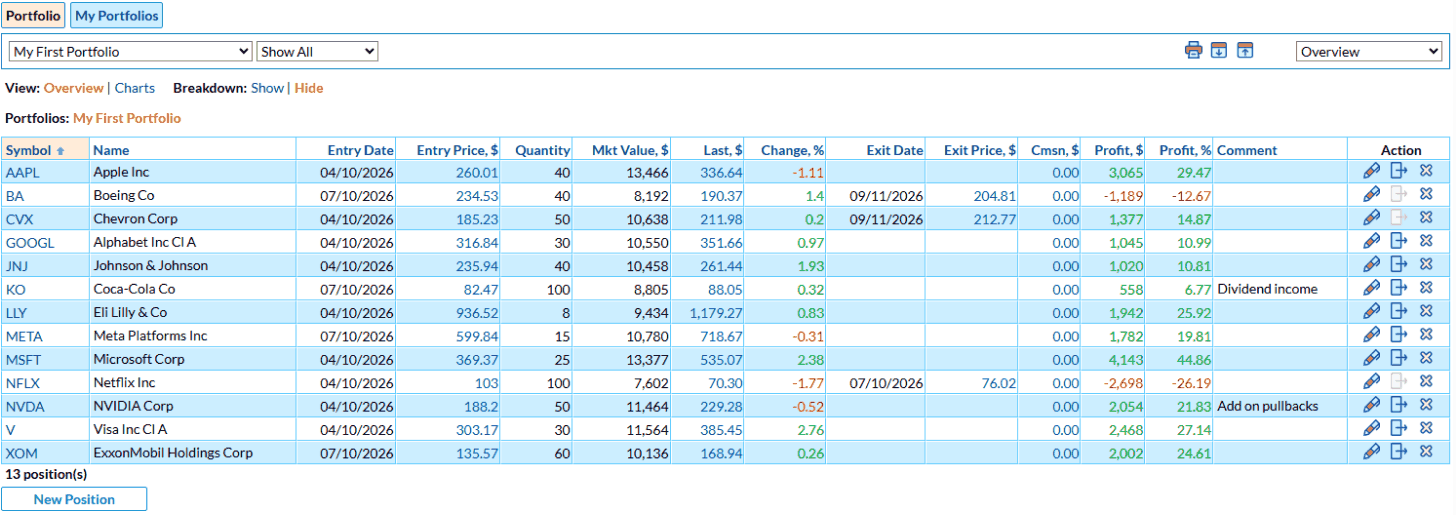
Portfolio Tracker positions with entry and exit prices, gain and loss

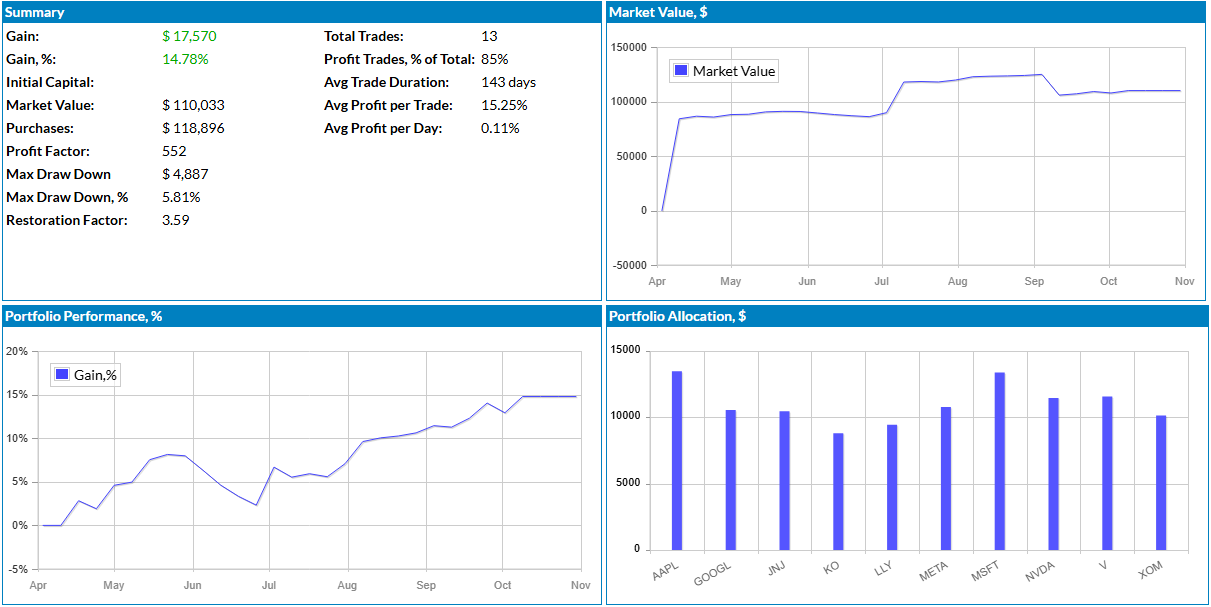
Portfolio Summary and Charts

The summary shows how the portfolio is doing as a whole: the total gain in dollars and percent, the market value and purchases, the profit factor, the maximum drawdown and the restoration factor, the share of profitable trades, the average trade duration and the average profit per trade and per day. Charts show how the market value and the performance of the portfolio changed over time and how your capital is allocated among the positions.

Portfolio summary with market value, performance and allocation charts

Trade Chart and Paper Trading

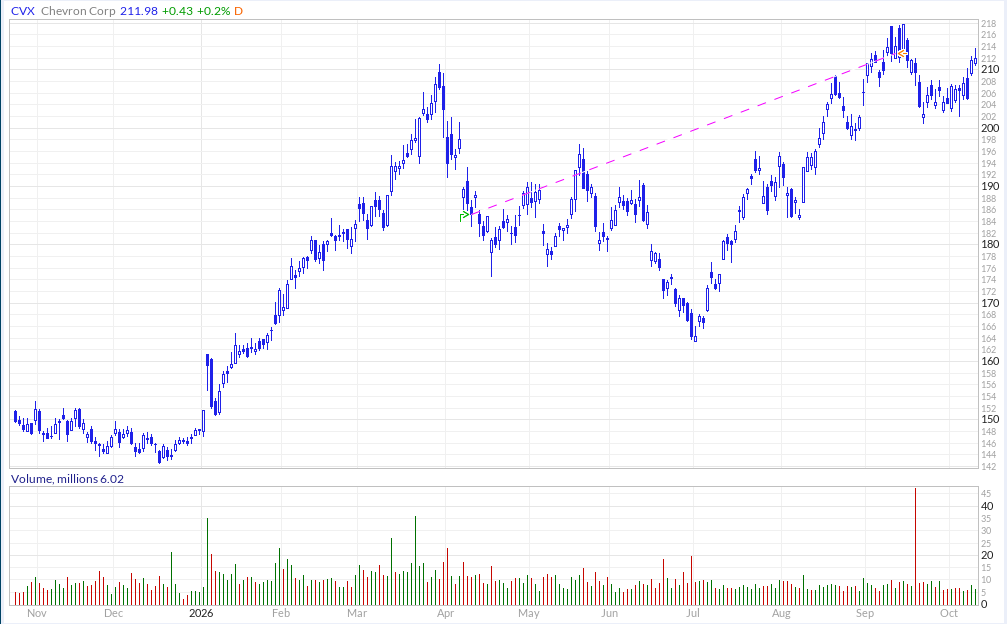
Click any symbol to see the position on a stock chart: the entry and the exit are marked with arrows and connected with a line, so you can see how each trade played out. Switch to the Charts view for a chart of every position, show a breakdown by sector and market cap, or switch between eleven views, from Fundamental and Technical to Price Performance and Dividend. Use the Portfolio Tracker to follow your brokerage account, or as a paper trading account to test a strategy before you trade it with real money. A portfolio can also be the stock universe of a screen in the Formula Screener or of a strategy in the Strategy Backtester. Start your free trial to create your first portfolio.

Trade entry and exit marked on the stock chart

Portfolio Tracker FAQ


What is a stock portfolio tracker?

A stock portfolio tracker keeps all your positions in one place and shows their current value, daily change and total gain or loss, so you can see how your investments perform without updating a spreadsheet by hand.

Which stocks can I add to a portfolio?

You can add stocks from more than 40 exchanges, including NYSE, Nasdaq, the London Stock Exchange and the Toronto Stock Exchange.

How do I add a stock to a portfolio?

Enter the symbol, and the Portfolio Tracker fills in the entry date, the price and the number of shares from the last price and the planned investment you set for the portfolio. You can change any of them, or add all the stocks listed in the Stock Screener results at once.

Can I import my positions from a CSV file?

Yes. Import a CSV file with the symbol, entry date, entry price and number of shares of each position, plus the exit date and price of closed positions. You can also export any view of the portfolio to CSV.

Can I track short positions?

Yes. Set the type of positions to Short when you create the portfolio. A portfolio holds either long or short positions, so keep a separate portfolio for each side.

How often are portfolio values updated?

Portfolios are updated intraday with the last price of each position, so the daily change and the gain or loss reflect the current market.

Can I use the Portfolio Tracker for paper trading?

Yes. Add positions without risking real money to test a trading idea or a screener-based strategy, and see how it performs before you trade it live.

Is the Portfolio Tracker free?

You can use the Portfolio Tracker during the 7-day free trial. To keep your portfolios after the trial, you need a paid membership.


Disclaimer - Privacy Policy - Terms of Service - Cookies - FAQ - Affiliates - Blog